Running CI on 3 Million Lines of Code in Under 3 Minutes
Most frontier labs have already said that their bottleneck is not writing code, but merging it. Even startups are feeling this. Our codebase has grown to over 3 million lines of code and 45k tests. The quality of those tests is questionable. Because of the flakes, I had to add a /babysit-pr skill to our codebase. Then CI started taking over half an hour, so I began queueing PRs to merge overnight. Eventually, a single PR kept me waiting over two days to merge and burned 4 hours and 9 minutes of total CI runtime. So I started fixing it. Along the way, an engineer challenged me to get CI under 3 minutes, with a drink on the line.
Optimizing CI through experiments
To compare CI changes properly, I tested tools, configs, and runner sizes across hundreds of experimental runs in parallel. A matrix in GitHub Actions really helps with this. You define a list of changes and runner sizes to quickly find the best combination. For example, inside a benchmark job:
strategy:
  matrix:
    runner:
      - blacksmith-4vcpu-ubuntu-2404
      - blacksmith-8vcpu-ubuntu-2404
    tool: [eslint, oxlint]
1. Upgrade your packages
The lowest-hanging fruit is making sure you use the latest versions across your tech stack. In just one year, performance across the TypeScript stack improved severalfold.
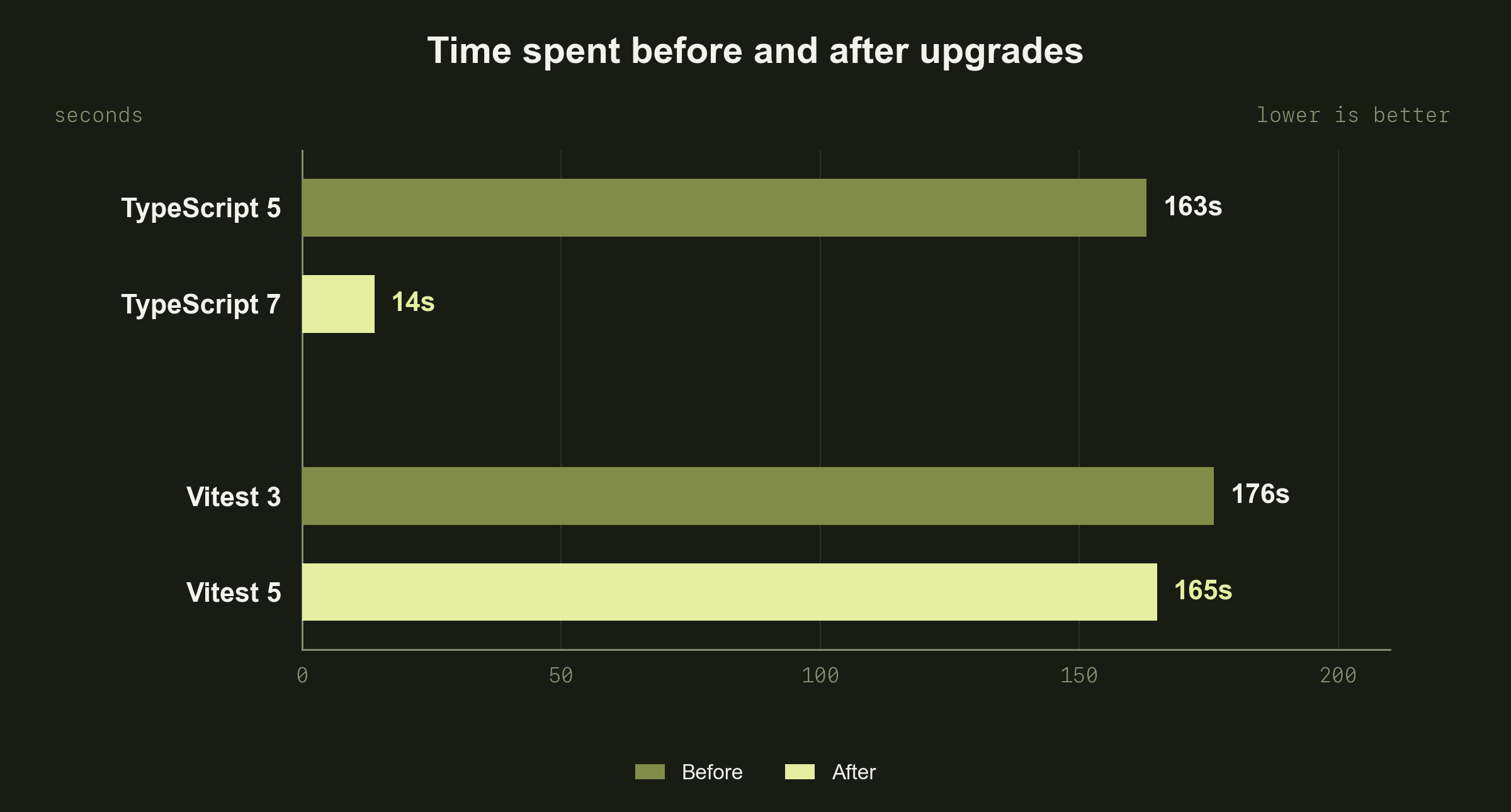
Microsoft ported the typechecker from TypeScript to Go. TS 7 runs as a native binary and uses multiple CPU cores, which drives the speedup.
2. Use faster tooling
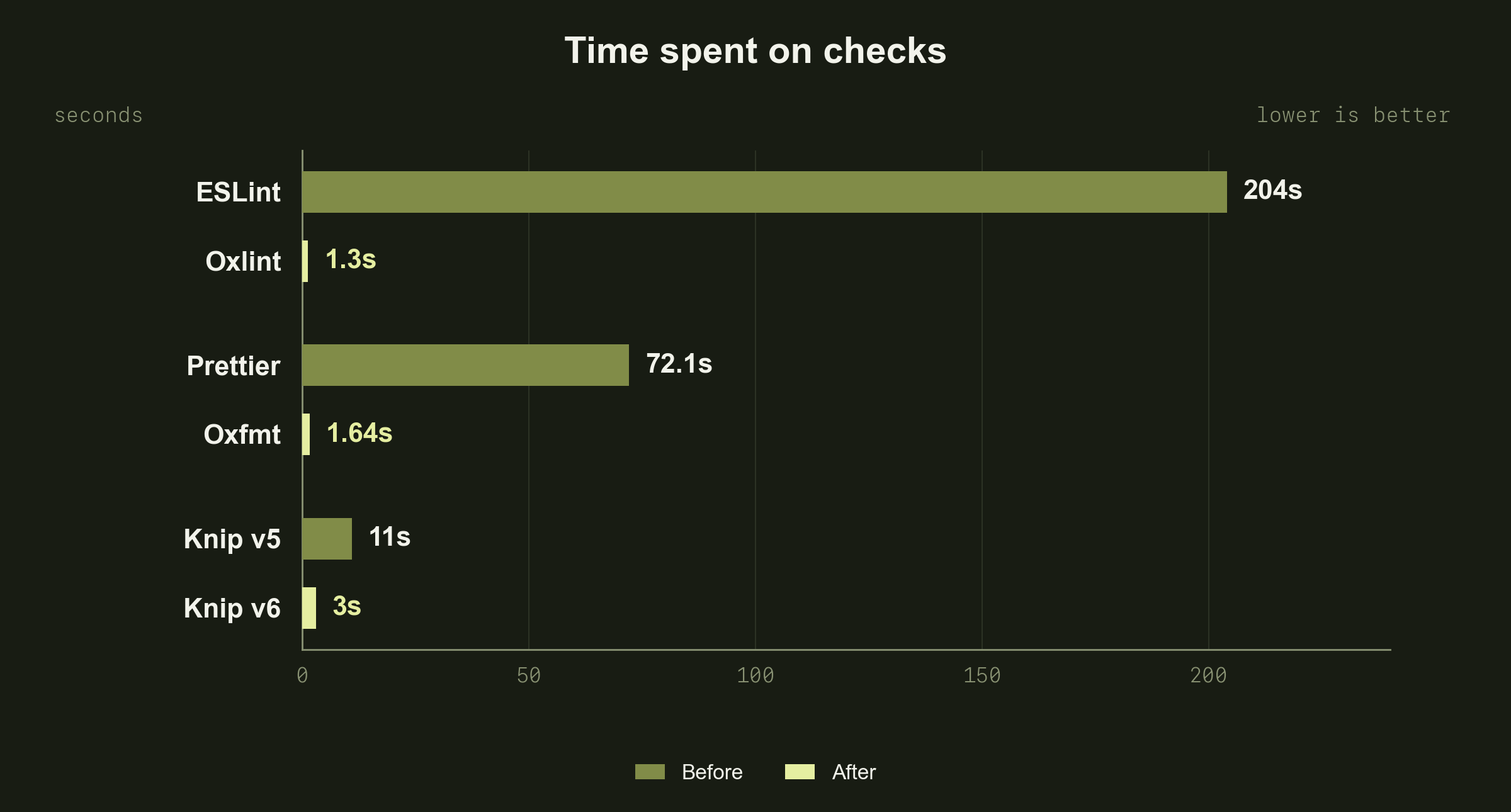
The best part of vibecoding is that it gave us faster dev tooling. TypeScript got Oxc, and Python got Ruff. Both are written in Rust. Oxc provides building blocks for parsing code, resolving imports, and transforming code. These are used by tools like:
- Oxlint for linting instead of ESLint.
- Oxfmt for formatting instead of Prettier.
- Knip v6 for finding unused code. It uses Oxc's parser and resolver.
Together, these changes saved over 4 minutes across these checks:
I also tested Rstest as a replacement for Vitest. It only helped with merging test coverage and results, and the migration required a diff of 125k lines. The improvement wasn't enough to justify such a big change, so I shelved it for now.
3. Shard tests
Sharding tests has the biggest impact on CI wall-clock time. It just needs to be done right. Track durations per test file and use a duration-based algorithm to pack them into shards with a target execution time. Pytest has this out of the box. Vitest requires a custom sharding implementation, which I wrote in Rust. I covered the implementation in a more involved piece: I used my brain instead of AI — now CI runs 70% faster.
I set a target of 90 seconds per shard. But on the first run, a few shards took 5 minutes. It turned out that the reported test durations didn't include the time needed to resolve TypeScript imports. Many tests report execution times of just a few milliseconds. When you run hundreds of those tests, imports dominate the runtime.
To account for this, I added a minimum estimated duration of 1.8 seconds per file. After a lot of testing, this seemed like a good balance and got the shards under 90 seconds. I also tried capping the number of files per shard, but that was less reliable. Some tests have many more imports than others. If a few of those land in the same shard, it becomes very slow. A better solution would be to track or estimate import time and include it in shard planning.
With E2E tests, I ran into another issue: one test file took 5 minutes to execute. No matter the target time, the algorithm couldn't split that file across shards. I had to split it manually. This needs ongoing monitoring to keep CI fast as tests grow.
Even after these changes, unit tests still took over 3 minutes. Merging test reports and coverage results from multiple shards was taking 75 seconds.
4. Rewrite parts of your CI in Rust
While testing Rstest, I noticed the improvements in merging test coverage and results. Instead of migrating everything, I rewrote just the merge code in about 1,000 lines. This task has a perfect setup for iterating with a coding agent. I gave it a metric to optimize—execution time—and a way to verify the logic: compare the output with Vitest. Then I asked it to try multiple languages:
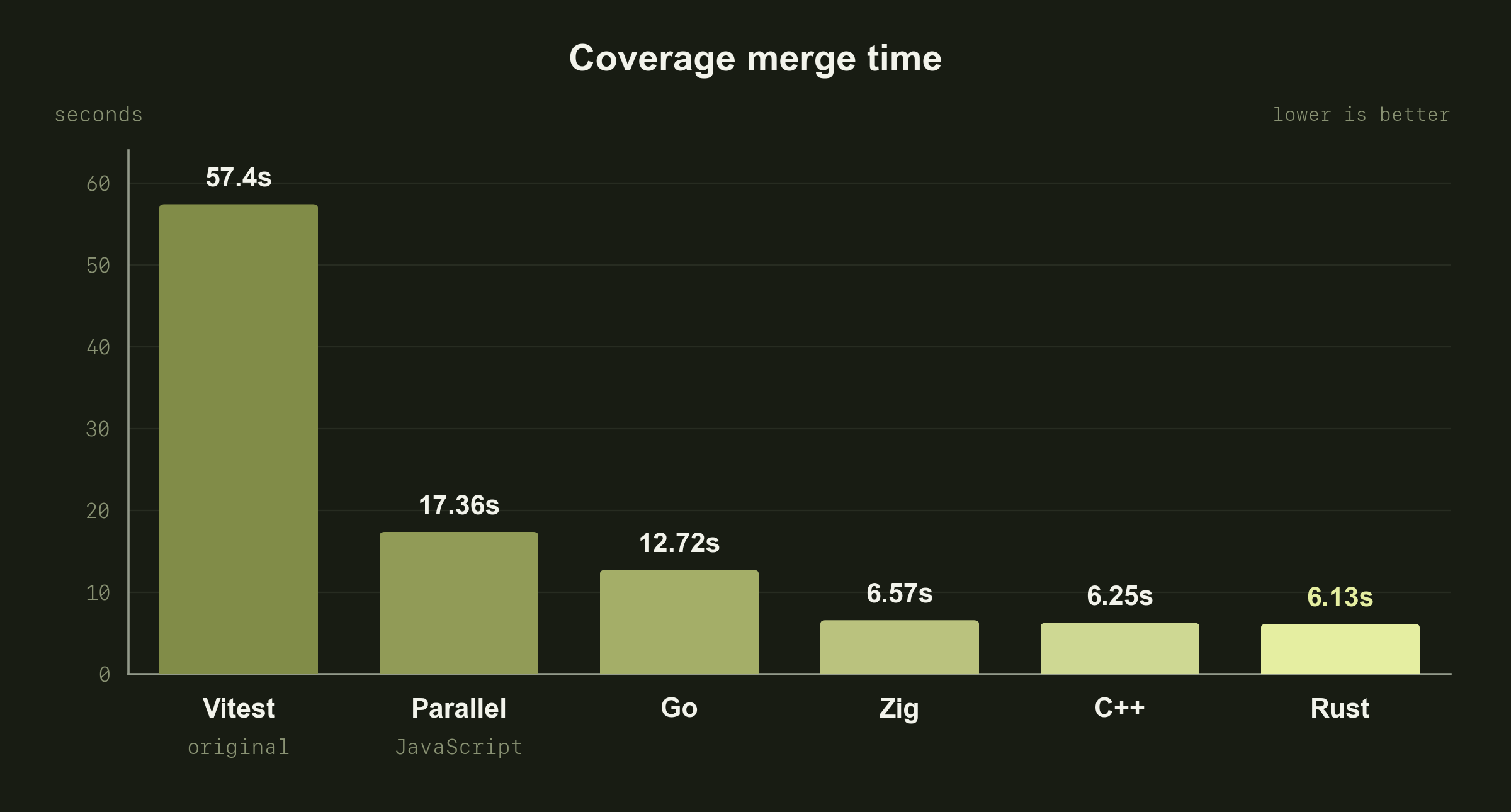
All three languages without garbage collection got down to about 6 seconds. I kept Rust because I'm more familiar with it and can maintain it in the long run. This put unit tests under 3 minutes. On to the next bottleneck.
5. Right-size your runners
Time to optimize hardware. It might seem counterintuitive, but for some jobs, larger runners can reduce costs. You're billed per minute, and doubling the runner size doubles the per-minute rate. If that cuts a job's runtime by more than half, you save money and speed up CI at the same time.
The fastest way is to switch runners to Blacksmith. With a one-line change, I saw 30–60% faster execution across jobs, especially compilation. Blacksmith uses gaming CPUs for its x86 runners. Their higher single-core performance compared with the server CPUs GitHub Actions uses explains the speedup.
Then size each job separately, using a GitHub Actions matrix to benchmark runner sizes. Here are the Playwright app build times I measured. These are incremental builds using an existing Next.js cache, with minification disabled:
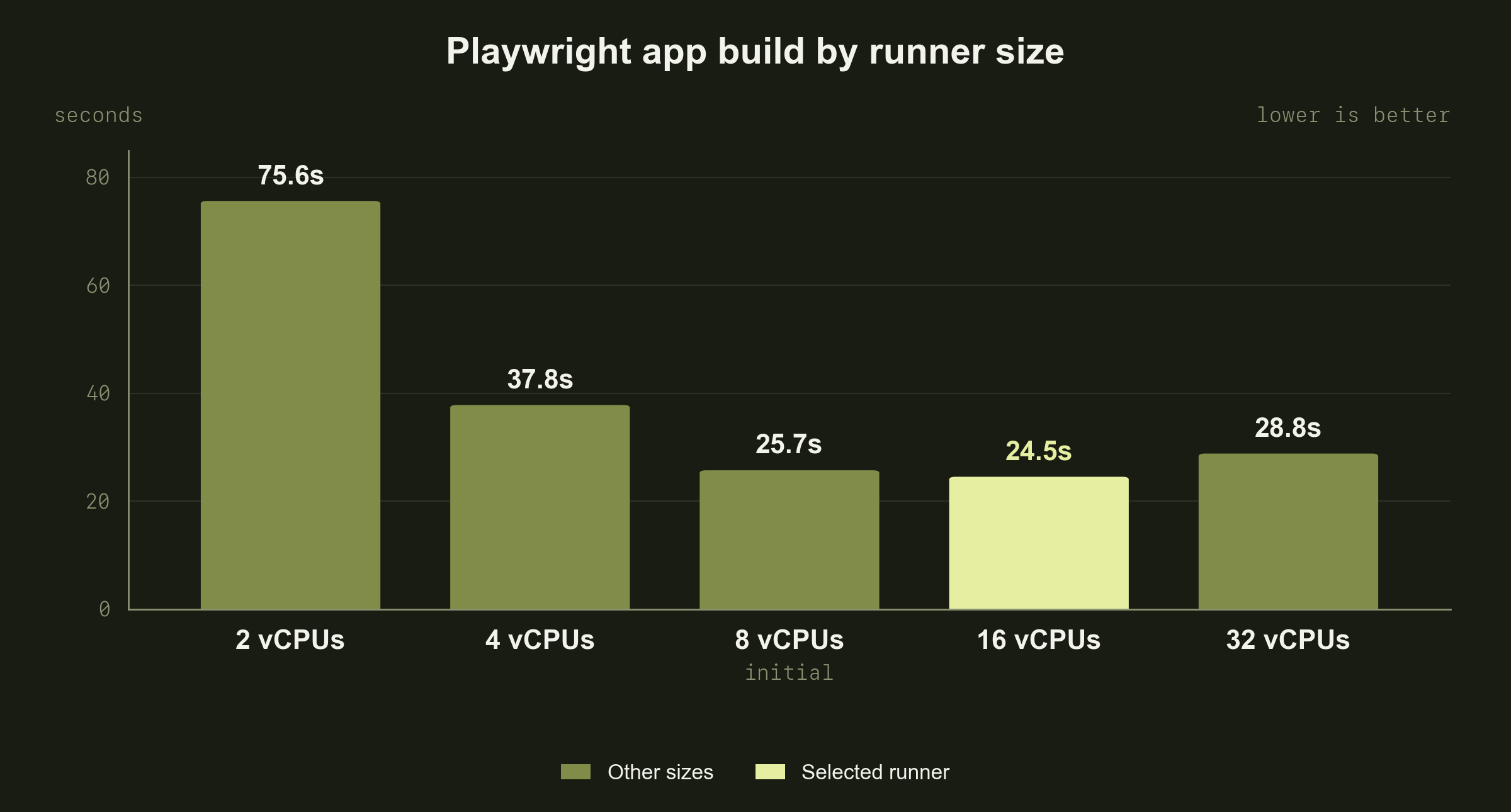
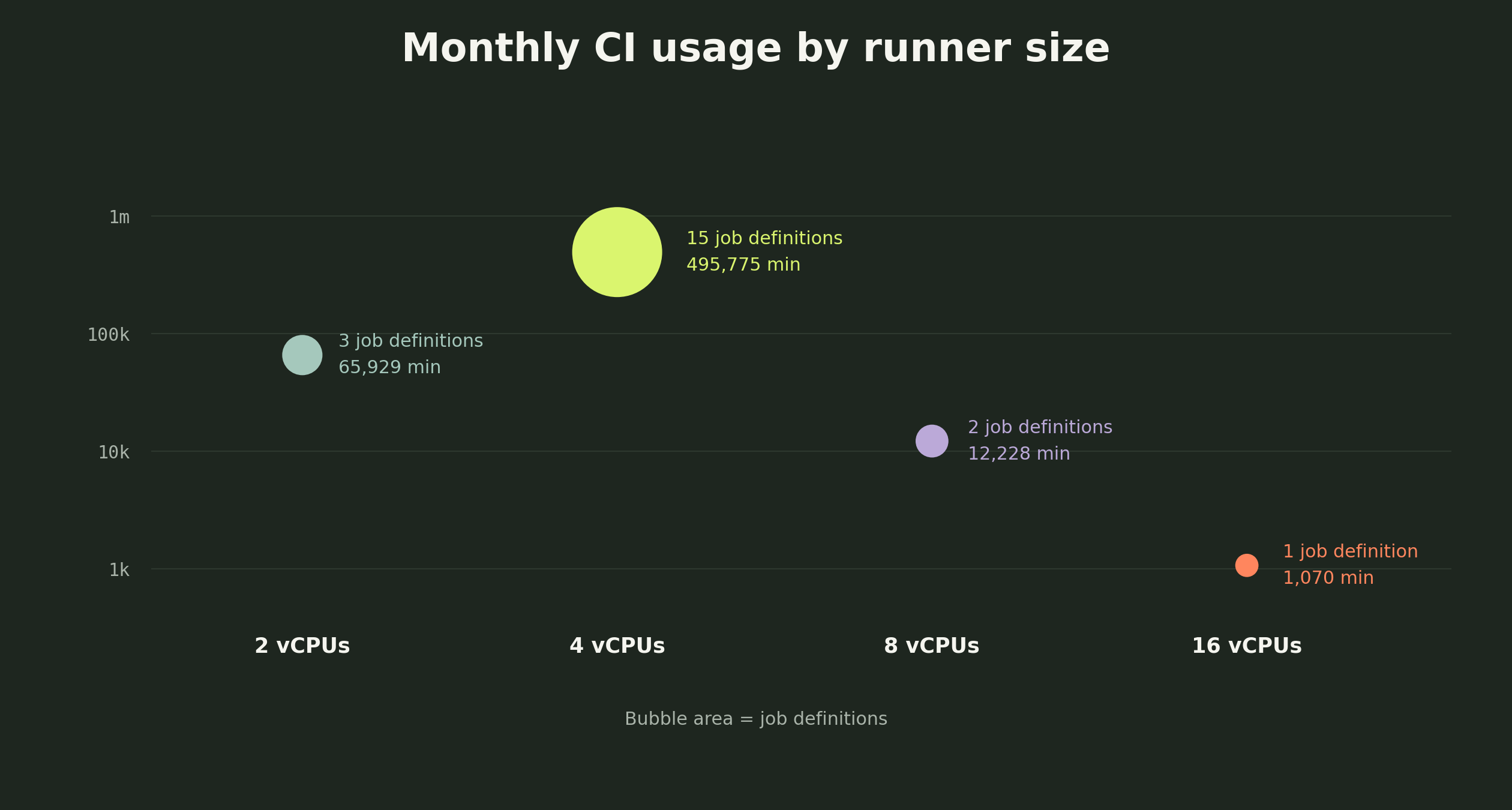
I also moved lightweight planning and gate jobs from 4 to 2 vCPUs, halving their per-minute rate. Most of our jobs use runners with 4 vCPUs, which seems to provide a good balance of cost and speed.
6. Use caching where it makes sense
There are 3 caching approaches in GitHub Actions and Blacksmith:
- Archive caches — download and extract saved files using
actions/cache. - Sticky Disks — mount a persistent filesystem instead of transferring an archive.
- Docker caching — reuse downloaded images or previously built layers.
Archive caches
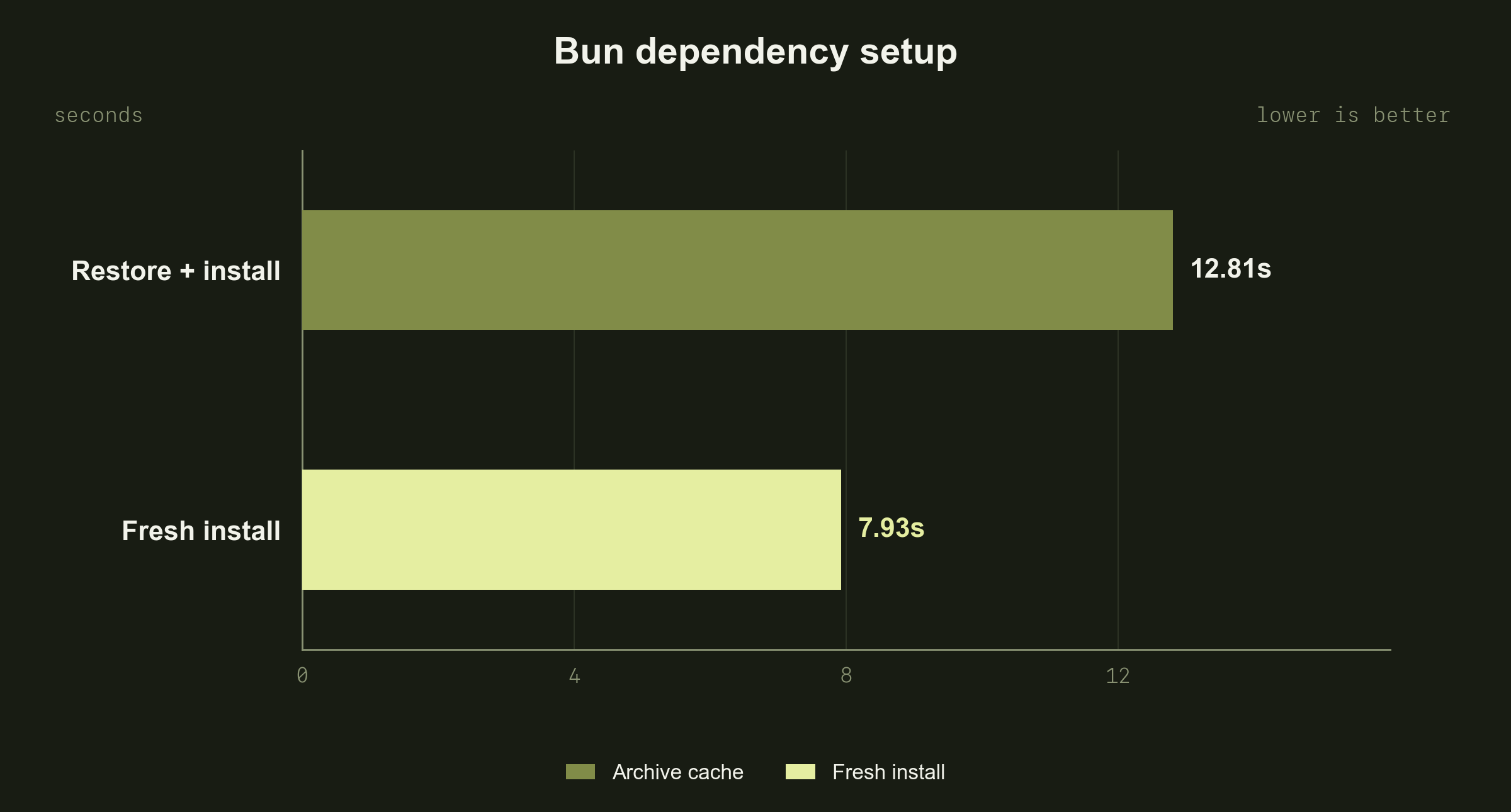
When you use a Blacksmith runner, GitHub's standard actions/cache already uses its colocated cache to speed up cache retrieval. So you get an instant speedup. But when I compared this with fresh Bun installs, it turned out Bun is so optimized that restoring and unpacking our 950 MB dependency archive takes longer than installing from scratch:
At the same time, build outputs were worth caching. In a separate benchmark, the full Playwright build job took 92s from scratch versus 45s with archive caches.
Sticky Disks
Sticky Disks are basically mounts. The idea behind them is that it's much faster to mount files than to download them from an archive cache. But as I already found out with archive caches, a fresh Bun install is still faster.
| Median, 3 trials each | Fresh dependencies | Sticky dependencies |
|---|---|---|
| Dependency setup, including mount | 3.43s | 5.21s |
| Playwright app build | 11.09s | 15.02s |
| Full build job, including cleanup | 33s | 44s |
Sticky Disks also power cached Git checkout. Use it when you need to pull Git history to determine affected files. Blacksmith checkout takes 2s instead of 26s with GitHub's native checkout.
Docker caching
I was restoring and loading a tar archive of our Supabase images. Blacksmith automatically caches pulled Docker images, but they have to be pulled directly on the runner. So removing that redundant archive saved 10–27s in integration and E2E tests.
7. Parallelize
At this point, I'm fighting for seconds. Most of the time is spent executing tests, so the remaining opportunity is test setup. Setup for both integration and E2E tests can be parallelized using the controls GitHub added this summer.
For integration tests, I parallelize all the prep work. Here's the simplified structure:
steps:
  - parallel:
      - name: Install dependencies

      - name: Download test selection

      - name: Prepare database

  # GitHub waits for every parallel step to succeed.

  - name: Run integration tests
For Playwright, I run database setup in the background while the remaining preparation steps run in order:
steps:
  - name: Prepare database
    id: database
    background: true

  - name: Install dependencies

  - name: Build app

  - name: Wait for database setup
    wait: database

  - name: Run Playwright tests
This saved 7–11 seconds for each test type.
8. Move noncritical jobs out of CI
Move jobs you don't directly act on within a PR out of required CI. CodeQL is a good example. I ran it on every PR, but I never addressed its findings in the same PR. Its TypeScript analysis took 7 minutes. I moved it to run nightly and on releases instead. Now we're notified about issues overnight and have time to fix them before the next release.
9. Make your CI flatter
As you expand CI and add new checks and tests, you'll probably add more gates. Over time, I ended up with three sequential gates. This added 15 seconds to every CI run, which is a lot when you're trying to get under 3 minutes. Merging the checks into one gate saved about 10 seconds and finally got CI under 3 minutes.
Dealing with flakes
Within a week, much of that work had been undone. CI was taking closer to 6 minutes than 3 because of flaky and slow tests. I realized I wasn't going to keep the median under 3 minutes without constant maintenance. So I created a maintenance agent.
Every 30 minutes, a scheduled job runs Codex with Hypha's setup to review CI runs. If a run takes over 3 minutes, Codex investigates the cause and opens a PR with a fix and evidence. An engineer gets notified in Slack, reviews the PR, and merges it.
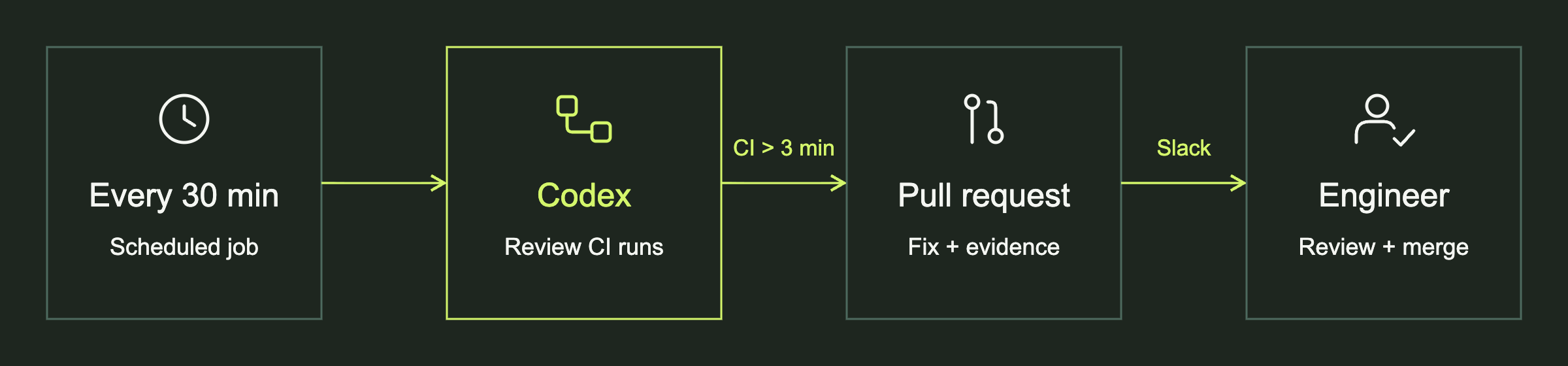
This keeps our CI close to 3 minutes. There are still some issues: engineers need to review and approve the fixes, and there's a wait of up to 30 minutes before the next review, plus the time needed to prepare and merge a fix.
I got CI under 3 minutes and reduced costs by about 25%. The main challenge was keeping it fast. Coding agents push so many bad tests that CI can degrade in a few days without monitoring and automated maintenance.